
Can a Robot Vacuum Handle Your Cables, Rugs and Furniture?
A robot can navigate a room well and still leave you lifting cables or cleaning the space beneath a chair. Before spending four figures, check the routes it needs to travel and the preparation you are willing to repeat.
In this article
Start with the rooms you want cleaned
Walk from the proposed dock location to each room you want the robot to clean. Include the trip home. A raised doorway matters much more when it blocks the kitchen than when it leads to a spare room you rarely use.
Then look within those rooms. Your problem might be a phone lead beside the sofa, a rug with loose fringe, or a dining chair whose low crossbar blocks access underneath. Each asks something different of the machine. Detecting a lead does not establish that it can cross a rug edge; fitting beneath the sofa at the front does not establish that it can travel all the way through.
Give each obstacle a place in your purchase decision:
| What you find | What to establish before buying | What you may still have to do |
|---|---|---|
| Leads that regularly lie on the floor | Independent evidence for that kind of small obstacle, plus the manual's preparation instructions | Lift or secure the leads before cleaning |
| Loose rug edges or fringe | Whether the robot can enter the rug and avoid catching its loose parts | Adjust the rug, exclude it or clean it separately |
| A raised doorway on a required route | The height and shape of the transition, and the conditions attached to any climbing claim | Use another approved route or keep that room outside the schedule |
| Low furniture or closely spaced legs | The lowest and narrowest points along the whole path, including crossbars | Move chairs or clean inaccessible areas yourself |
| A cramped dock location | Installation space and access for the robot and for you | Choose another location or reconsider the setup |
Some preparation can be done once. A charging lead can sometimes be routed safely away from the floor. Other preparation comes back every day, such as shifting dining chairs. Write down both. A robot may suit the open living area even if you keep vacuuming the study yourself.
Cable avoidance still leaves a preparation job
The Saros 10R and Dreame X50 Ultra show why good obstacle avoidance deserves a closer reading. In its Saros review, RTINGS found strong navigation around furniture but trouble with USB cords and rug tassels. Its X50 review also reported occasional USB cable tangles and, less often, extension cord tangles requiring intervention.[1][2]
Those findings are useful checks against broad claims about recognising objects. They are international tests of the named models, rather than proof of performance on the current Australian firmware. They also do not establish a household failure rate or tell you how your particular lead will behave.
Roborock's Saros 10R manual still tells owners to tidy cables and loose items and to follow the robot through its first cleaning route.[3] Budget for that preparation even if you choose sophisticated obstacle detection. A cable caught beneath a brush is a poor way to discover whether the camera saw it.
Rugs create two separate access problems
Check the edge the robot must climb and the loose material it could catch. A firm edge, a curled corner and a fringe are different obstacles even when they belong to the same rug.
Both RTINGS reviews identified tasseled rugs as a problem. On the Saros, the more cautious Sensitive obstacle setting could also leave substantial areas uncleaned or prevent transitions from bare floor to carpet.[1][2] That makes coverage part of the decision. A run that finishes without a rescue can still leave work for you.
Inspect the rug as it sits during normal use. Does the edge lie flat? Do chair legs push it into a fold? Is the fringe on the robot's required approach? Ask for evidence that addresses that condition. A video showing a machine on top of a rug tells you little about how it got there.
If you are happy to remove a small decorative rug before a scheduled run, count that as recurring preparation. If you prefer a no-go zone, count the excluded area as manual cleaning. Neither choice has to rule out a robot for the rest of the room.
Measure the whole furniture path
Measure from the floor to the lowest obstruction along the intended route. Check the underside of the furniture, its legs and any crossbars. A generous opening at the front of a sofa can conceal a lower support farther back.
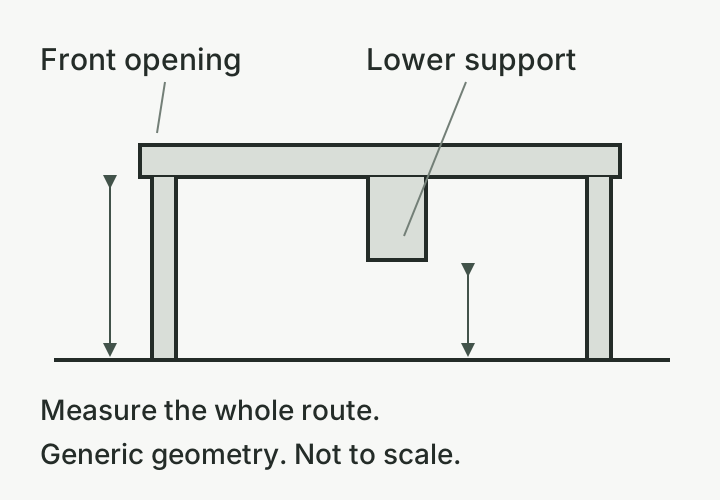
Published body dimensions help narrow a shortlist. Roborock lists the Saros 10R robot at 350 × 353 × 79.8 mm. Dreame lists the X50 Ultra at 350 × 350 × 89 mm with its sensor retracted, and 111 mm high with the sensor raised.[4][5] These are manufacturer dimensions, rather than guaranteed operating clearances.
The X50's default safety settings can stop it entering an opening too close to its lowered sensor, according to RTINGS. Dreame also warns that near-body-height operation can scratch the robot and requires flat furniture undersides without protrusions.[2][5] Keep the safety settings intact when assessing fit. Do not make a purchase depend on forcing the robot into a gap barely larger than its body.
Width needs the same attention. Measure between the nearest legs and consider whether there is room to approach, turn and leave. For a chair or table, test the arrangement you actually use. Moving every chair out of the dining area may produce a clear route, but it also adds a job before each run.
Where furniture access is your main reason for buying, ask the seller for model-specific guidance using your measurements and photographs. There is no single clearance margin in the reviewed evidence that makes every underside safe.
Read the conditions behind a climbing claim
Dreame's advertised 6 cm crossing capability for the X50 Ultra applies to staggered steps with a gap greater than 4 cm. Its published limit for a single vertical step is 4.2 cm. Both figures come from internal laboratory testing, with environmental conditions affecting results.[5]
A 6 cm vertical lip therefore falls outside that 6 cm claim. Before comparing specifications, measure the height of each step and the horizontal space between them. Take a side-on photograph too. Shape matters to identifying which published claim applies.
For a doorway that controls access to an essential room, seek evidence for a closely matching transition and confirm any app setup requirements. A maximum number on a product page gives you a condition to investigate. It cannot promise success across every timber trim, rug edge or sliding-door track.
Avoid improvising a ramp or changing settings simply to chase the maximum height. Follow the manufacturer's installation and operating guidance. If the required transition remains unresolved, decide whether cleaning that room separately is acceptable before ordering.
Check the dock and the return terms
The robot also needs a workable base. Allow space for approaching and leaving, opening the dock and handling its tanks. A station squeezed into a cupboard can fit as an object while being awkward to operate.
For the Saros 10R, the manual specifies a hard, flat floor and reserved space of at least 0.75 m in height, 0.4 m in width and 1.2 m in depth; its installation diagram labels these distances as more than those values.[3] Leave room beyond them and use the instructions for the exact dock you are buying. The corresponding X50 installation clearances were not established in our reviewed material, so obtain its Australian manual before planning a tight location.
Return terms matter when fit is uncertain. Dreame's Australian warranty page describes a 30-day return request without giving a reason, with conditions including packaging and buyer-paid change-of-mind freight. Its separate refund policy makes change-of-mind returns discretionary, requires unopened and unused goods, and specifies a 10% restocking fee if accepted.[6][7] Those pages do not establish a usable in-home trial. Ask the seller to confirm in writing whether opening and running the robot is permitted, and what fees apply.
Australian consumer guarantees are separate from a voluntary change-of-mind policy. They apply automatically and can continue beyond a manufacturer's warranty; simply changing your mind does not itself create a refund entitlement.[8] Keep the seller's written advice about a specific required use with your purchase records.
Sources & evidence
Prices and published terms checked 9 October 2026. This guide draws on published specifications, instructions and independent reviews. It contains no Meleus & Mosman hands-on test results.
- 01RTINGS: Roborock Saros 10R review↩
Navigation, cable and rug findings, and Sensitive-setting limitations.
- 02RTINGS: Dreame X50 Ultra review↩
Cable, fringe and furniture access findings; default clearance protection.
- 03↩
- 04Roborock Australia: Saros 10R↩
Published robot dimensions.
- 05Dreame Australia: X50 Ultra↩
Published dimensions, clearance caution, step-crossing conditions and listed price.
- 06Dreame Australia: warranty policy↩
Published return request conditions.
- 07Dreame Australia: refund policy↩
Separate change-of-mind conditions.
- 08↩
- 09Roborock Store ANZ: Saros 10R↩
Australian SKU, price and pre-order timing.